
Most teams integrating AI into customer support expect to cut costs. For the first few weeks, they do. Then month two arrives, and the invoice is 3x what they budgeted. Here is why that happens - and how a single architecture decision prevents it.

The "infinite scale" trap
The marketing pitch for AI support is true: a language model can handle a thousand simultaneous conversations. What the pitch skips is that every one of those conversations costs money - at the token level, per call, per provider. Without any guardrails, usage compounds silently.
A bot that triggers three LLM calls per user message (classification, retrieval, synthesis) can spend $0.03 per message. Multiply by ten thousand messages a day and you have a $300 daily API bill before your team has noticed anything is wrong. By the time the invoice arrives, there is nothing left to do except pay it.
Unlimited scale is not a feature. It is a risk that needs an off switch.
Why standard rate limits do not help
Most platform-level rate limits protect the provider's infrastructure, not yours. They cap the number of requests per minute, not the total spend per month. You can hit a rate limit and still run a $40,000 monthly bill because rate limits reset every sixty seconds.
Per-provider cost limits exist in some dashboards, but they apply to the entire account - not to a specific bot, workspace, or use case. If you have five bots on one API key and one of them goes rogue, the others get cut off too.
The architecture fix: hard caps per unit
The solution is granular budget enforcement at the level that actually matters: the individual bot. Not the account. Not the team. The bot.
At Specteron, every bot carries its own monthly spend cap. When the cap is reached, the bot stops making LLM calls and falls back to a graceful escalation message. No overage. No surprise. The billing envelope is contractually enforced at the routing layer, not left to a credit card limit on an upstream provider account.
Three budget controls that actually work
1. Absolute monthly hard stops. The bot cannot spend more than the defined ceiling per calendar month. No exceptions. This single rule eliminates billing surprises entirely for teams running predictable support volumes.
2. Rate limits per domain and per API key. A single customer session cannot exhaust the budget. Per-domain limits prevent one embedded widget from spike-consuming the total workspace budget during a traffic event.
3. Percentage-based alert webhooks. When spend hits 70% of cap, the team receives a webhook. At 90%, another. At 100%, the bot gracefully degrades. Engineering is never the first to learn about a budget problem from a CFO email.
The hidden cost: model routing
Different queries need different models. A question about a refund eligibility policy does not need GPT-4o. A GPT-4o Mini or Claude Haiku response is accurate enough and costs a fraction of the price.
A well-designed gateway routes by intent. Low-complexity queries - FAQ lookups, status checks, simple acknowledgements - go to the cheapest capable model. Complex multi-step reasoning or sensitive escalations go to the most capable one. This alone can reduce per-conversation cost by 60-80% with no visible quality drop for end users.
What this looks like in practice
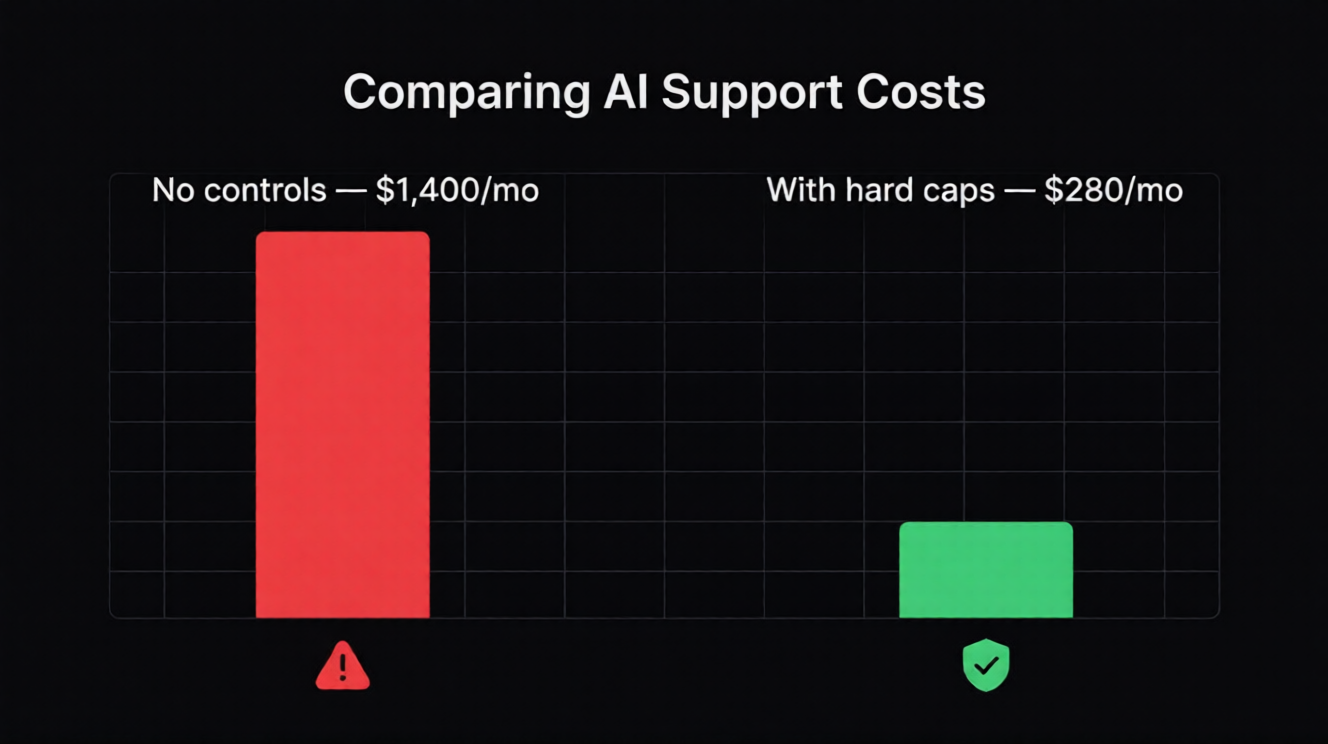
A realistic mid-scale SaaS support setup: 8,000 conversations per month, mixed complexity. With no cost controls and a single premium model: approximately $1,400/month in LLM spend. With per-bot hard caps, intelligent model routing, and domain-level rate limits: approximately $280/month. Same coverage, same response quality for complex queries, predictable invoice.
The difference is not clever prompting. It is the infrastructure layer between your application and the provider API.
Starting point for your team
Define your acceptable monthly LLM budget per bot before launching anything. Set the hard cap to 80% of that number and the webhook alert at 60%. Route all classification and retrieval intents to smaller models and reserve your primary model only for synthesis and escalation handling.
If you do those three things before your first production deployment, the unpredictability problem disappears before it starts.
Chcesz wdrożyć AI support?
Uruchom bezpłatny trial Specteron i zobacz, jak to wygląda w praktyce.
Zacznij teraz